API Key Authentication & Permission Scopes
All Wisprs API requests authenticate with a bearer token. Keys are scoped — each key only carries the permissions you explicitly grant it, so you can limit exposure in production environments.
Creating a key
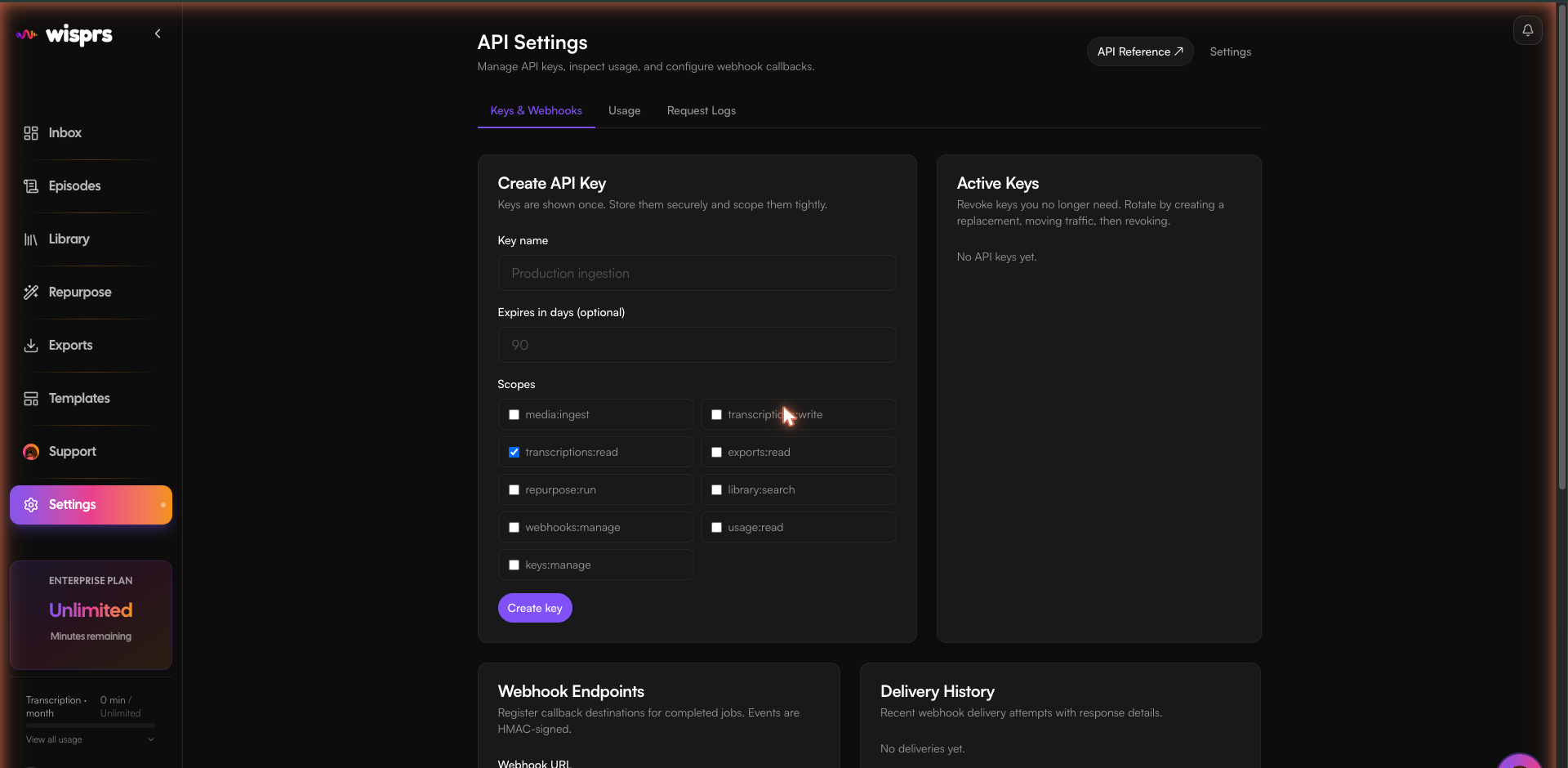
Go to Dashboard → API Settings. Name your key, choose an optional expiry, and select scopes. The raw key is shown once on creation — store it securely.
Marketplace ownership
RapidAPI requests are identified by RapidAPI's proxy verified X-RapidAPI-User header after the proxy secret is checked. Jobs, retries, uploads, library results, and webhook endpoints stay within that subscriber. Existing marketplace jobs created before subscriber ownership was recorded cannot be safely assigned to a subscriber and are not visible through marketplace polling.
Apify runs share a publisher key, so a job submit response includes a per-job jobAccessToken. Send it as X-Wisprs-Job-Token when polling, retrying, exporting, or generating derived content. Save it with the job ID; it is a bearer secret. Apify integrations receive per-job webhooks through the submit request's webhookUrl; shared endpoint management and library search are not available to the shared Apify key.
Using your key
Pass the key as a Bearer token in every request:
import { WisprsClient } from '@wisprs/sdk';

const client = new WisprsClient({
  apiKey: process.env.WISPRS_API_KEY!,
});
import os
from wisprs import WisprsClient
client = WisprsClient(api_key=os.environ["WISPRS_API_KEY"])curl https://wisprs.co/api/v1/usage \
-H "Authorization: Bearer sk_your_api_key"Scopes
| Scope | What it grants |
|---|---|
| media:ingest | Submit URLs and upload files for transcription |
| transcriptions:write | Create transcription jobs |
| transcriptions:read | Read job status and transcript text |
| exports:read | Download exports (txt, srt, vtt, json, md, docx) |
| repurpose:run | Generate summaries, chapters, quotes, blog posts, threads |
| library:search | Semantic search across your transcript library |
| webhooks:manage | Create and manage webhook endpoints |
| usage:read | Read your usage metrics and request logs |
| keys:manage | Create and revoke API keys (restrict carefully) |
Rate limits
Rate limits apply per key, per minute:
| Tier | Requests / min |
|---|---|
| Free | 10 req/min |
| Basic | 60 req/min |
| Pro | 200 req/min |
| Enterprise | 1,000 req/min |
When you hit the limit you receive 429 Too Many Requests with a Retry-After header.
Error responses
{
  "success": false,
  "error": "Invalid API key"
}
401 = missing/invalid key · 403 = missing scope · 429 = rate limit exceeded.
FAQ
Can I use OAuth instead of API keys?
The public REST API documented on this page uses API keys. The hosted Wisprs MCP connector uses a separate browser OAuth flow with its own five-scope contract; see MCP connector documentation. OAuth access does not turn an API key into a host token.
How do I rotate a compromised key?
Go to Dashboard → API Settings, revoke the old key, and create a new one with the same scopes. Old keys are invalidated immediately on revocation.
What happens if I exceed my rate limit?
You receive a 429 Too Many Requests response with a Retry-After header indicating when you can retry. No requests are dropped silently.