Wisprs vs Otter AI
Wisprs vs Otter.ai: file-first transcription in 100+ languages (30 min/day free, plans from $25/mo) vs a live meeting bot from ~$8.33/mo. Honest breakdown.
Wisprs
Transcription first. Files in, clean transcripts out.
A real-time, in-meeting assistant (OtterPilot) built for live meeting notes.
Switching from Otter.ai? Try Wisprs on one real file
Clean transcripts with speaker labels in minutes. Export TXT, SRT, VTT, DOCX. 100+ languages.
30 minutes a day free. No credit card. Cancel anytime.
Trustpilot 3.8/5 across 554 reviews: billing, cancellation and consent are the recurring lows, while B2B sites (G2 and Capterra, both 4.4) skew higher.
“Is Otter worth it for meeting minutes? An overwhelming no.”— Reddit thread
Competitor ratings are from third-party review sites and reflect scores at the time of writing; they change over time. Synthesized from G2 (462), Capterra (102) and Trustpilot (554) ratings plus Reddit and forum threads, captured 2026-06-30. Pricing drifts; confirm on otter.ai/pricing.
Wisprs vs Otter.ai: feature comparison
| Capability |  Otter.ai Otter.ai |  WisprsRecommended WisprsRecommended |
|---|---|---|
| Pricing model | Per-user meeting plans: Pro ~$8.33-16.99/mo, Business $20-30/user/mo | Flat minute buckets: Pro $25/mo (1,000 min), Studio $79 (3,000), Agency $149 (5,000) |
| Entry paid price | Pro from ~$8.33/mo (1,200 min, ~10 file imports/mo) | Pro $25/mo (1,000 min, file-first) |
| Free tier | 300 min/mo, 30 min per conversation | 30 min/day free (no card) |
| Accuracy | Good on clean single-speaker audio; users report drops on accents, jargon and noise | Excellent on clear audio; varies by accent, language and recording quality |
| Languages | A small, English-centric set | 100+ languages with auto-detect |
| Speaker labels | Generic Speaker 1/2; weak on multi-speaker audio | Speaker labels on paid plans |
| Exports | TXT/DOCX/SRT-style exports, meeting-oriented | TXT, SRT, VTT, DOCX (plus Markdown and JSON) |
| File upload workflow | Meeting-bot first; Pro caps file imports (~10/mo) | Upload audio or video of any length within plan minutes |
| Meeting bot | Yes: OtterPilot auto-joins Zoom, Meet, Teams | No bot; record, then upload |
| Turnaround | Live during the call; summary minutes after | A few minutes after upload |
Why teams switch from Otter.ai
Recurring themes from public reviews and community threads — paraphrased, with sources. Your mileage will vary; this is what users most often cite.
Speaker labels you cannot trust
Transcripts collapse to generic Speaker 1 and Speaker 2, so it is hard to tell who said what, and summaries and action items suffer. It gets worse with more speakers or accents.
Reported on G2, Reddit
Accuracy drops on real-world audio
Accents, non-native speakers, jargon and background noise reliably reduce accuracy and force manual correction.
Reported on Capterra, Reddit, TrustRadius
The consent and privacy problem
Otter is the named defendant in a consolidated U.S. class action over its bot recording people who never consented; users report it auto-joining meetings uninvited and emailing colleagues.
“spreads virus-like to colleagues without permission”— user reviews
Reported on Reddit, Trustpilot
The quiet Pro-plan squeeze
Pro minutes were cut from 6,000 to 1,200 per month with no price drop, and Pro caps uploads at about 10 files a month, pushing heavy uploaders onto the pricier Business tier.
Reported on 2026 pricing reviews
Updated August 2026
Wisprs vs Otter.ai comes down to one simple choice: live capture or post-recording output. Pick Otter.ai if you need notes while people are still talking. Pick Wisprs if you need clean, editable transcripts you can ship somewhere else.
That difference sounds small. It isn’t. Timing changes everything downstream. Otter.ai sits inside meetings and writes as people speak. Wisprs starts after the recording exists and turns it into something usable, captions, articles, translations, structured data.
Here’s what that looks like with real numbers. A 45-minute Zoom call with Otter gives you a live transcript and a summary within a couple minutes after the call ends. The same 45-minute file in Wisprs processes in a few minutes, then you edit once and export to SRT, Markdown, or JSON without reformatting.
Summary (meta-ready): Wisprs vs Otter.ai. Otter.ai focuses on real-time meeting notes and fast summaries. Wisprs focuses on file-based transcription, 100+ languages, speaker labeling on paid plans, and exports that plug into real workflows.
Quick verdict: wisprs vs otter.ai
You don’t need a long comparison to decide. Start with how your work actually happens.
- If you need notes during meetings: choose Otter.ai.
- If you work from recordings and need transcripts you can edit and export: choose Wisprs.
Quotable one-liner: "Otter.ai captures meetings live; Wisprs turns recordings into publish-ready transcripts."
That line holds up in real use. If your output is something you’ll skim once and forget, Otter fits. If your output becomes a blog post, captions, or data you reuse, Wisprs fits better.
Run a simple test. What happens 24 hours after the meeting or recording? If the work is done, Otter works. If you’re still editing, publishing, or analyzing, Wisprs was built for that second phase.
See the difference on your own audio
Upload a file, get a transcript with speaker labels, and export it. Free for 30 minutes a day.
30 minutes a day free. No credit card. Cancel anytime.
Who should choose Otter.ai (otter ai vs wisprs)
Otter.ai works best when everything happens inside the meeting. It joins calls, listens in real time, and shows notes as the conversation unfolds. That’s the core loop, and it’s fast.
Teams that run back-to-back meetings stick with Otter because it removes steps. A sales rep finishes a 30-minute demo and sees a summary within minutes. A manager searches across dozens of past meetings by keyword without uploading anything. There’s no file handling and no processing queue.
A typical use case: a customer success team runs 6-8 calls per day, each around 30 minutes. Otter joins automatically, records, and highlights key moments. Within one or two minutes after the call ends, the rep has a summary they can use for follow-up emails.
Use Otter.ai if your workflow looks like this:
- You run frequent meetings and need notes without extra steps.
- You want a bot that joins calls and captures everything automatically.
- You mostly work in English and don’t need broad translation coverage.
- You care more about quick summaries than polished transcripts.
There are trade-offs, and they show up quickly. The meeting bot model can feel heavy if most of your work happens after recording. You’re also adding a third participant to every call. In some companies, that means legal review or explicit consent, especially for external calls or sensitive topics.
If your work starts and ends in meetings, those trade-offs are usually fine. If your work continues after the meeting, they start to slow you down.
Who should choose Wisprs (wisprs vs otter)
Wisprs starts where Otter.ai stops. You bring a recording, audio or video, and we turn it into something you can actually use.
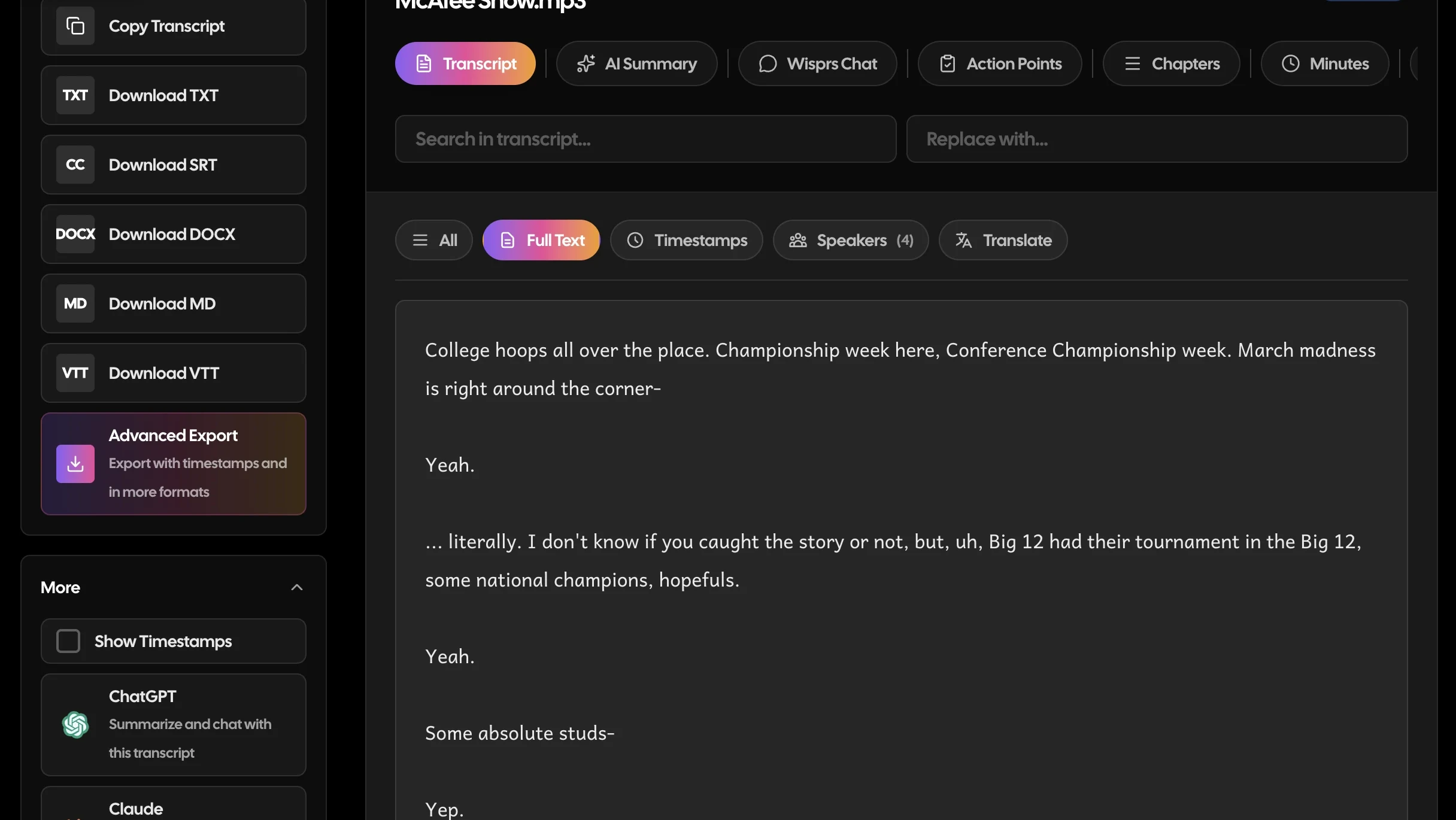
We built Wisprs for people who don’t live inside meetings. Podcasters, editors, researchers, and teams working with interviews or multilingual content. You upload a file, get a transcript back, clean it up, and export it in the format you need.
Turnaround is fast enough to stay in flow. A 60-minute audio file typically processes in a few minutes, not hours, depending on queue and file quality. In practice, you upload, step away, and come back to a draft transcript ready for edits.
Wisprs supports 100+ languages with automatic detection. You don’t need to tag files ahead of time. Drop in a mixed-language interview, say English and Spanish, and it detects what’s spoken without manual setup. That saves time when you’re handling global content or user research across regions.
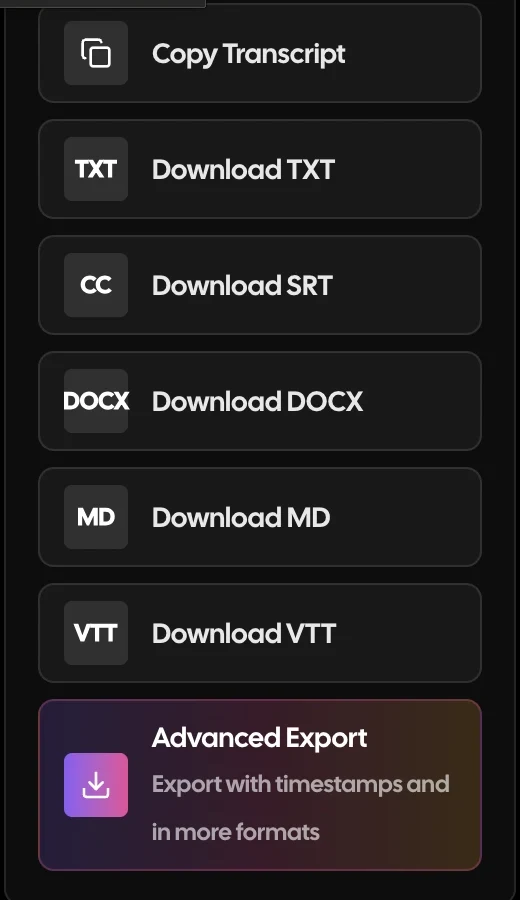
Exports are where this becomes practical. You can send the same transcript to different tools without reformatting:
- SRT for YouTube captions with timestamps intact
- VTT for HTML5 video players
- Markdown for blogs or documentation
- JSON with timestamps for analysis pipelines
That removes the usual “copy, paste, fix formatting, repeat” loop teams deal with after transcription.
Use Wisprs if your workflow includes:
- Uploading recorded audio or video for transcription.
- Editing transcripts into articles, captions, or reports.
- Working across languages or translating content.
- Exporting to SRT, VTT, DOCX, Markdown, or JSON.
- Avoiding meeting bots and handling recordings directly.
Privacy is simpler here. Wisprs is file-first, so you’re not injecting a bot into live conversations. Teams working with clients, research participants, or recorded interviews often prefer that because it avoids extra approvals.
Workflow fit, by persona: wisprs vs otter.ai comparison
The same recording can feel smooth in one tool and painful in another. It depends on where the product starts. Here’s how that plays out with real scenarios and actual numbers.
Podcaster: from recording to published episode assets
Podcasters don’t need notes while recording. They need assets after. Transcripts, captions, show notes, and sometimes translations.
With Wisprs, the flow is direct. Upload your final audio, MP3, WAV, M4A, or MP4, run transcription, edit inside the transcript editor, label speakers on paid plans, and export.
Example: a 50-minute podcast episode with two hosts and one guest. You upload the mastered file, get a transcript back in a few minutes, fix speaker names in under 10 minutes, then export:
- SRT for YouTube
- Markdown for your blog CMS
- DOCX for a sponsor approval
Total active time is usually 20-30 minutes. Before this setup, many teams spent 60-90 minutes bouncing between tools.
Otter.ai can record conversations, but that’s not how most podcasts are produced. Podcasts are edited, mixed, and finalized before publishing. Wisprs fits that step directly. Otter doesn’t.
If you publish weekly, saving even 20 minutes per episode adds up to more than 17 hours per year.
Researcher: long interviews and structured analysis
Researchers deal with long recordings and need structure. Not just text, but timestamps, speakers, and formats that plug into analysis tools.
Wisprs handles multi-hour uploads and gives you speaker labeling on paid plans. You can export JSON with timestamps, which makes it easier to import into scripts or qualitative analysis tools.
Example: a UX researcher runs 12 interviews, each 75 minutes. That’s 900 minutes of audio. Instead of manually cleaning transcripts, they:
- Upload all files in batches
- Export JSON with timestamps
- Run keyword searches like “pricing confusion” or “onboarding issue”
What used to take a full day of manual review becomes a few focused hours.
Otter.ai can capture interviews live, but its strength is recall, not reuse. Once you need structured exports or cross-interview analysis, you start working against the tool instead of with it.
The difference shows up when you move from reading transcripts to actually using them as data.
Sales team: from recorded calls to follow-up actions
Sales teams split into two camps. Some want live notes. Others record calls and review them later.
If you need real-time capture, Otter.ai is the faster path. Notes appear during the call, and summaries show up within minutes. A rep can finish a 30-minute demo and send a follow-up email in under five minutes using those notes.
If you record calls and process them later, Wisprs fits better.
Example: a sales manager reviews 10 recorded calls every Friday, each about 40 minutes. That’s over six hours of content. Instead of scrubbing through video:
- Upload calls in bulk
- Search transcripts for keywords like “budget,” “timeline,” or “objection”
- Export key sections for coaching
That cuts review time from hours to something closer to one focused session.
The key question is simple. Does the work happen during the call or after?
Meeting owner: live notes vs post-meeting clarity
Meeting owners often assume they need real-time notes. Sometimes they do. Sometimes they don’t.
Otter.ai gives you visibility during the meeting. Notes appear live, summaries land quickly, and everyone can reference the same transcript immediately. That’s useful for alignment in fast-moving teams.
Wisprs gives you clarity after the meeting.
Example: a 90-minute strategy session with five stakeholders gets recorded. Instead of relying on rough notes:
- Upload the recording
- Clean the transcript in 15-20 minutes
- Export a polished version for stakeholders
Now you have something readable and shareable, not just a raw log.
If decisions happen in the meeting, Otter helps. If communication happens after, Wisprs is the better fit.
Feature comparison snapshot: wisprs vs otter.ai
Features only matter if they match how you work. Here’s a grounded snapshot with real implications.
- Live meeting capture: Otter.ai handles this in real time. Notes appear during the call, and summaries typically show up within a couple minutes after it ends.
- File uploads and long recordings: Wisprs is built for large files. Upload a two-hour recording without splitting it, then process it in one pass.
- Language support: Wisprs supports 100+ languages with automatic detection. This matters when your input isn’t predictable.
- Export formats: Wisprs exports to TXT, SRT, VTT, DOCX, Markdown, and JSON. You can move straight into publishing or analysis without extra tools.
- Speaker labeling: Available on paid Wisprs plans. Useful for interviews, podcasts, and any multi-speaker content where attribution matters.
- Privacy model: Wisprs is file-based. Otter.ai runs inside meetings, which can require consent or policy review depending on your org.
Each feature ties to a real outcome. Live capture saves time during meetings. Structured exports save time after.
Pricing at a glance
Pricing follows product design. Otter.ai prices around meetings. Wisprs prices around transcription volume.
Here’s a concrete snapshot of Wisprs plans. Always confirm before buying.
What this means in practice:
A solo creator uploading one 60-minute episode per week uses about 240 minutes per month. That’s well within the 1,000-minute Pro plan, with room for extra clips or interviews.
A small agency processing 2-3 hours of content per day will hit 60-90 hours per month. That pushes them into Studio or Agency tiers, where the effective per-hour cost drops and stays predictable.
A research team running 20 interviews at 45 minutes each uses 900 minutes. That fits inside Pro, with space for follow-ups.
Otter.ai often starts cheaper at entry tiers (Pro is listed from about $8.33 a month billed annually on the Otter.ai pricing page), but those plans are built for meetings: the free plan caps each conversation at 30 minutes and Pro caps file imports at about 10 a month. If your workload is file-heavy, the pricing model matters more than the headline price. Reviewers on G2 rate Otter 4.4/5 across 462 reviews, and the most common 2026 complaints are the Pro minute cut and cancellation friction rather than the live-notes experience itself.
Wisprs plans are on the pricing page, and the free audio to text tool lets you test a short file without an account.
Always check current pricing before deciding. Numbers change.
Bottom line: wisprs alternative to otter.ai
This choice is simpler than it looks. Do you need notes while people are talking, or something usable after?
Choose Otter.ai if your priority is live notes and quick recall. Choose Wisprs if your priority is turning recordings into structured, reusable content you can publish, analyze, or translate.
Otter.ai captures the conversation. Wisprs helps you do something with it.
Otter.ai vs Wisprs: the verdict
Both are solid tools that serve different jobs. Here is the quick version.
Choose Otter.ai if you
- You need notes while the meeting is still happening, not after
- You want a bot that auto-joins Zoom, Meet or Teams and captures every call
- You mostly work in English and do not need broad language coverage
- You want the cheapest entry price and only transcribe a handful of files a month
- Quick meeting recall matters more than a polished, exportable transcript
Choose Wisprs if you
- You upload recordings (podcasts, interviews, research, lectures) rather than live-record meetings
- You need 100+ languages with automatic detection
- You need speaker labels you can rely on for multi-speaker audio (paid plans)
- You export to TXT, SRT, VTT or DOCX and publish or analyze the result
- You do not want a bot in client or participant calls, and want to start free with 30 minutes a day, no card
How to switch from Otter.ai to Wisprs
Takes a few minutes. Nothing to install, no downtime.
In Otter, open each conversation and use Export to download the transcript (TXT or DOCX) and, if you kept them, the original audio files.
Create a free Wisprs account: 30 minutes of transcription a day, no credit card.
Upload your audio or video files (MP3, WAV, M4A, MP4 and more); Wisprs auto-detects the language and, on paid plans, labels speakers.
Edit the transcript, then export TXT, SRT, VTT or DOCX and drop it into your CMS, video editor or analysis tool.
Still comparing? Test it, no card needed
30 free minutes a day covers an interview or a podcast episode.
30 minutes a day free. No credit card. Cancel anytime.
Frequently asked questions
Is Wisprs more accurate than Otter.ai?
Accuracy depends on the input more than the tool. Clean audio with good microphones will always produce better transcripts than noisy calls.
In practice, a well-recorded podcast or interview produces a cleaner draft than a live meeting with cross-talk and background noise. Wisprs is built for those cleaner inputs and offers higher-tier speech models on paid plans.
The real difference shows up in editing time. With clear audio, cleanup often takes 5-15 minutes per hour of content instead of a full rewrite.
Can Wisprs replace Otter.ai for meetings?
Not directly. Wisprs doesn’t join meetings or write notes in real time.
If your workflow depends on live capture, Otter.ai is the right tool. If you record meetings and process them after, common for interviews, reviews, or compliance, Wisprs covers that workflow cleanly.
Some teams use both. Otter for capture, Wisprs for cleanup and export.
Does Wisprs support more languages than Otter.ai?
Wisprs supports 100+ languages with automatic detection and translation.
That matters when your input varies. For example, a support team handling Spanish and English calls can upload recordings, transcribe them, and export translated summaries without switching tools.
Language support changes over time, so check the features page for current coverage.
Which is better for exporting transcripts and captions?
Wisprs gives you more control over exports.
You can download TXT, SRT, VTT, DOCX, Markdown, or JSON and move straight into your workflow. That removes extra conversion steps.
Example: export SRT for captions and Markdown for a blog post from the same transcript in under a minute. No extra tools needed.
How do I choose between them for my team?
Start with timing. When do you need the output?
If you need notes during meetings, choose Otter.ai. If you need polished transcripts after recordings, choose Wisprs.
A quick rule: if your team spends more time editing, publishing, or analyzing transcripts than sitting in meetings, Wisprs will fit better. If the opposite is true, Otter.ai will feel faster.
How much does Wisprs cost compared to Otter.ai?
Otter.ai Pro is listed from about $8.33 a month billed annually (up to $16.99 monthly) for 1,200 minutes, with Business at $20 to $30 per user. Wisprs Pro is $25 a month for 1,000 minutes, Studio $79 for 3,000 and Agency $149 for 5,000. Otter is cheaper at the entry tier; Wisprs is priced for file volume, languages and exports rather than per-user meeting seats. Confirm current rates on each pricing page.
Which has the better free plan, Wisprs or Otter.ai?
Otter.ai gives 300 minutes a month with a 30-minute cap per conversation. Wisprs gives 30 minutes of file transcription every day with no credit card, so a daily user gets more total minutes and there is no per-conversation cap, only a per-file limit. If you want to test on your own audio, the Wisprs free tier is the quicker check.
Does Wisprs offer speaker identification like Otter.ai?
Yes, on paid plans. Wisprs labels speakers on uploaded recordings and lets you rename them in the editor before you export. Otter labels speakers too, but reviewers on G2 and Reddit repeatedly note that its labels collapse into generic Speaker 1 and Speaker 2 on multi-speaker or accented audio, so check both on a real file.
How do I switch from Otter.ai to Wisprs?
Export your existing conversations from Otter (TXT or DOCX) so you keep a copy, then sign up for Wisprs free, upload your audio or video files, and export TXT, SRT, VTT or DOCX from the transcript editor. There is nothing to import: Wisprs works from the recording, not from Otter's data. If you still need live notes for some meetings, many teams keep Otter for capture and use Wisprs for the recordings they publish.
Can I cancel Wisprs or get a refund?
Yes. You can cancel at any time from your account settings and keep access until the end of the billing period, with no cancellation fee. Wisprs also offers a 30-day money-back guarantee on paid plans. Otter reviews on Trustpilot frequently mention cancellation friction, so read its terms before subscribing.
Does Wisprs have a meeting bot like Otter.ai?
No. Wisprs is file-first: you record the call with your meeting tool, then upload the recording. There is no bot joining calls, which avoids consent surprises for external or sensitive meetings. If you specifically need a bot that joins and takes notes live, that is Otter's core job, and Wisprs is not a substitute for it.
Which is better for podcasters, researchers or teams?
Podcasters and researchers usually pick Wisprs because they work from finished recordings and need speaker labels, 100+ languages and SRT, VTT or DOCX exports. Meeting-heavy teams that want live notes usually pick Otter. If your team does both, the best Otter.ai alternatives list covers tools for each side, and the Wisprs features page shows what happens after the transcript.
Compare Wisprs to other tools
 ComparisonWisprs vs Happy Scribe
 ComparisonWisprs vs Sonix
 ComparisonWisprs vs Scribie
 ComparisonWisprs vs DeepgramPricingFree tier, Pro, Studio, Agency.All featuresSpeaker ID, exports, 100+ languages.Free audio to textTry one file, no account.
Looking for a Otter.ai alternative that just transcribes?
Upload audio or video, get clean transcripts with speaker labels in minutes, and export to TXT, SRT, VTT, or DOCX. Plans from $20/mo billed annually when you need more.
30 minutes a day free. No credit card. Cancel anytime.